Inicio rápido
Empieza directamente una sesión de 15, 25, 45 o 60 minutos, con nombre de tarea opcional.
Temporizador Pomodoro para la barra de menús de macOS

La concentración en la barra de menús y descansos de verdad en tu jornada
Desde inicios rápidos y ritmos personalizados hasta descansos a pantalla completa e historial local, Weeko Focus cuida tanto el trabajo completado como la recuperación entre sesiones.
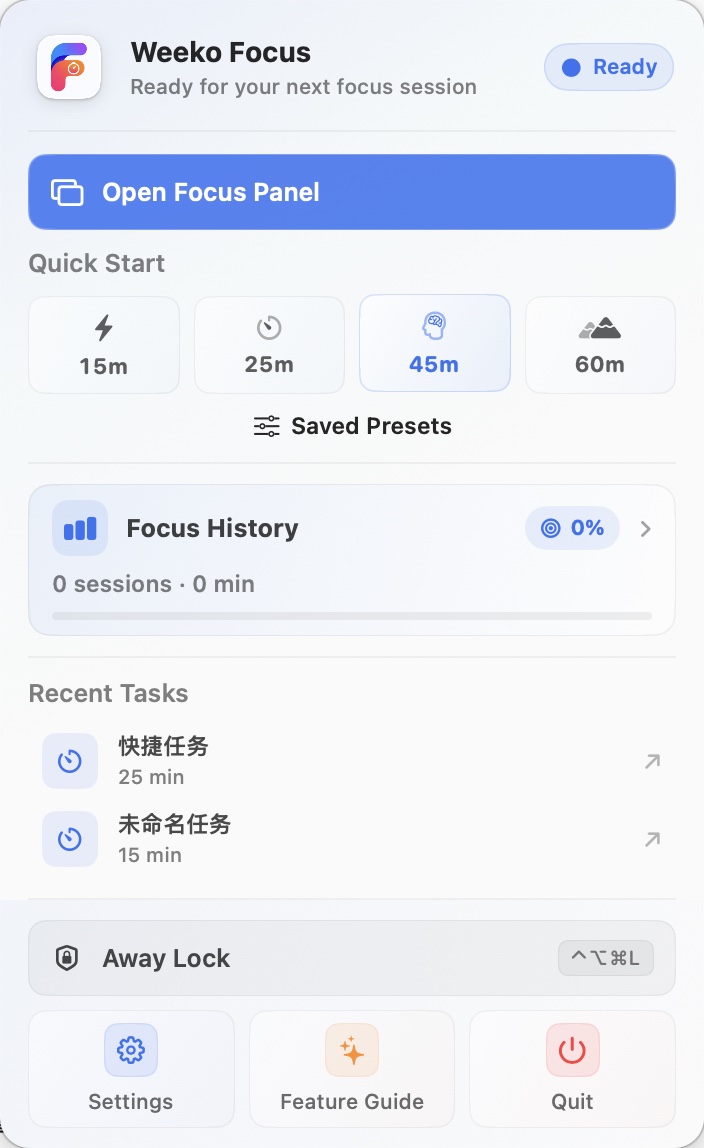
Inicia una tarea, consulta el progreso y controla la concentración o el descanso sin mantener abierta una ventana principal.
Empieza directamente una sesión de 15, 25, 45 o 60 minutos, con nombre de tarea opcional.
Pausa, continúa, añade cinco minutos, completa antes o termina. Los descansos también se pueden pausar o saltar.
Recupera una tarea reciente con sus tiempos o inicia una configuración guardada desde el menú.
El panel muestra tarea, cuenta atrás y anillo de progreso. Cerrarlo no detiene el temporizador.
Configura por separado concentración, descanso corto y descanso largo, y decide cuándo empieza automáticamente la siguiente etapa. Los tiempos quedan guardados en este Mac.
Elige una duración adecuada, desde una tarea rápida hasta un tramo largo de trabajo profundo.
Añade recuperación entre sesiones y reduce el tiempo continuo frente a la pantalla.
Inicia un descanso largo cada 2–6 sesiones, con intervalo y duración configurables.
Inicia automáticamente los descansos y, si quieres, la siguiente concentración al terminar.
Tras un cierre inesperado o reinicio, la etapa pendiente se restaura usando la hora de finalización guardada.
Define objetivos por tiempo o cantidad. La barra de menús muestra el progreso diario en directo.
El descanso a pantalla completa crea distancia con la tarea. Para una ausencia breve, la protección cubre la pantalla y pausa el temporizador.
Cubre las pantallas elegidas, oculta el Dock y la barra de menús y muestra la cuenta atrás con un texto personalizado.
Iníciala desde el menú o un atajo para tapar el trabajo y reanuda el temporizador tras desbloquear.
La salida puede exigir mantener pulsado y usar Touch ID o la contraseña del sistema. Esta protección no sustituye el bloqueo de macOS.
La gestión del historial forma parte de la experiencia básica. Los registros permanecen en este Mac y pueden revisarse, corregirse o exportarse.
Busca nombres de tareas y filtra por fecha, estado de finalización o tarea.
Consulta duración prevista y real, horas de inicio y fin, y corrige el nombre de una tarea.
Exporta todo el historial o los resultados filtrados actuales a la ubicación elegida.
Elimina un registro o todo el historial. Las estadísticas relacionadas se actualizan.
Pro organiza los registros locales en cinco vistas de análisis sobre tiempo, tareas y objetivos.
Consulta sesiones válidas, tiempo total, tasa de finalización, objetivo y cronología del día.
Compara duración, cantidad, días de la semana y horas de inicio en 7, 30 o 90 días.
Revisa la dedicación diaria en el calendario y abre el historial de una fecha.
Agrupa cantidad, duración y finalización por tarea para entender dónde se invierte el tiempo.
Revisa resultados diarios y semanales, rachas de cumplimiento e hitos alcanzados.
Configura las respuestas y el panel mientras mantienes un límite claro alrededor de los datos locales.
Controla por separado los avisos de fin de sesión, descanso y objetivo, y envía una prueba.
Configura atajos para el panel, el temporizador y la protección al ausentarte.
Elige posición, inicio de sesión, icono del Dock y tiempo restante en la barra de menús.
Usa español, inglés, chino simplificado o tradicional, japonés, coreano, francés o alemán.
Weeko Focus no necesita cuenta y actualmente no ofrece sincronización ni copia automática en la nube.
Free incluye temporizador, descansos, objetivos y gestión del historial. Pro añade todos los análisis y aumenta los límites de tareas y preajustes.
Pro ofrece compras anual y de por vida con restauración de compras. Productos, precios, periodos y disponibilidad siguen la información actual de App Store.
No automáticamente. Los datos principales permanecen por defecto en este Mac y la versión actual no tiene cuenta, sincronización ni copia automática en la nube.
La app guarda la etapa, la tarea y la hora prevista de fin. Al abrirla restaura una concentración, descanso o estado en pausa que no haya terminado.
No. Sirve para tapar el trabajo y pausar el temporizador durante una ausencia breve. Usa el bloqueo de macOS si te ausentas más tiempo.
Las sesiones terminadas de forma natural o anticipada cuentan para los objetivos activos de tiempo o cantidad. Las interrumpidas o incompletas no.
Sí. Búsqueda, filtros por fecha, estado o tarea, cambio de nombre, borrado y exportación CSV están disponibles en Free.
Pro desbloquea resumen de hoy, tendencias, calendario, estadísticas de tareas y objetivos, amplía tareas recientes y preajustes de 2 a 20 y añade Ping y Purr.