Start quickly
Begin a 15-, 25-, 45-, or 60-minute focus session directly, with an optional task name.
Pomodoro timer for the macOS menu bar
Keep focus in the menu bar and make room for real breaks
From quick starts and custom rhythms to full-screen breaks and local records, Weeko Focus supports both the work you finish and the recovery between sessions.
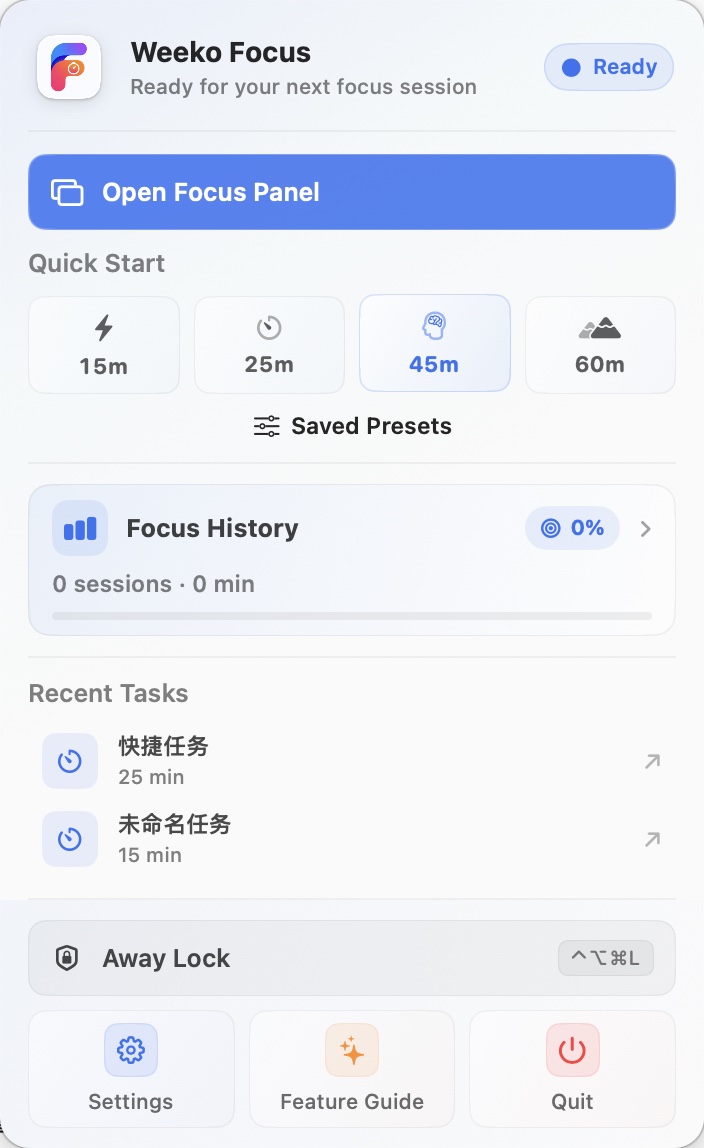
Start a task, check progress, and control the current focus or break without keeping a main window open.
Begin a 15-, 25-, 45-, or 60-minute focus session directly, with an optional task name.
Pause, resume, add five minutes, finish early, or end focus. Breaks can also be paused or skipped.
Restore a recent task and its timing, or launch a saved focus and break configuration from the menu.
See the task, countdown, and progress ring in a dedicated panel. Closing it does not stop the timer.
Set focus, short-break, and long-break rules separately, then choose when the next stage should begin automatically. Timing settings are saved on this Mac.
Choose a suitable length for anything from a quick task to a longer stretch of deep work.
Add a brief recovery period between focus sessions to reduce uninterrupted screen time.
Take a long break after every 2–6 completed focus sessions, with both values configurable.
Start breaks automatically, and optionally begin the next focus session when a break ends.
After an unexpected exit or restart, unfinished stages are restored from their saved end time.
Set goals by duration or count. The menu bar shows live progress for the daily goal.
Full-screen breaks create distance from the current task, while away protection covers the screen and pauses the timer when you leave your desk briefly.
Cover selected displays, hide the Dock and menu bar, and show a break countdown with custom rest copy.
Start it from the menu or a shortcut to cover current work. The paused timer can resume after unlocking.
Exiting can require a press-and-hold plus Touch ID or the system password. Away protection does not replace the macOS lock screen.
History management is part of the core experience. Records stay on this Mac and can be inspected, corrected, or exported when needed.
Search task names and filter records by date, completion status, or task.
Review planned and actual duration, start and end times, and correct a task name.
Export all history or the current filtered results to a location you choose.
Delete one record or clear all focus history. Related statistics update with those changes.
Pro organizes local records into five analysis views for time patterns, task investment, and goal performance.
See effective sessions, total time, completion rate, goal progress, and today’s timeline.
Compare 7-, 30-, or 90-day duration, count, weekday, and start-time patterns.
Review daily effort on a calendar and jump directly to the history for a selected date.
Aggregate focus count, duration, and completion by task to see where time is going.
Review settled daily and weekly goals, completion streaks, and progress milestones.
Adjust feedback and panel behavior while keeping a clear boundary around local focus data.
Control focus-end, break-end, and goal reminders separately, and send a test notification.
Configure shortcuts for the panel, timer control, and away protection.
Choose panel position, launch at login, Dock visibility, and menu bar remaining time.
Use English, Simplified Chinese, Traditional Chinese, Japanese, Korean, Spanish, French, or German.
Weeko Focus needs no account, and the current version has no cloud sync or automatic cloud backup.
Free includes complete timing, breaks, goal settings, and history management. Pro adds the full analytics workspace and larger task and preset limits.
Pro offers annual and lifetime purchase options and supports Restore Purchases. Products, prices, periods, and availability follow the current App Store listing.
It does not upload them automatically. Core focus data stays on this Mac by default, and the current version has no account system, cloud sync, or automatic cloud backup.
The app saves the current stage, task, and expected end time. Reopening it restores an unfinished focus, break, or paused state.
No. It is designed to cover current work and pause the timer during a short absence. Use the macOS lock screen when leaving for longer.
Naturally completed and finished-early focus sessions count toward enabled duration or count goals. Interrupted and unfinished records do not.
Yes. History search, date/status/task filters, rename, deletion, and CSV export are all available in Free.
Pro unlocks Today Overview, trends, calendar, task statistics, and goal progress; raises recent tasks and presets from 2 to 20; and adds Ping and Purr sounds.